Tuning parameters
The Tuning tab lists the parameters that the running controller declares itself. Switch controllers and the list changes with it. Per-joint parameters are grouped under one name, such as kp[0]–kp[5], and each row shows its allowed range on the right.
A gain has two names: kp[0] and kp. are the same gain.
- On screen it is always
kp[0]. Hover over the name to see the ROS parameter name (kp.).j0 - Exported files (CSV, JSON) and
ros2 paramuse the ROS parameter name.
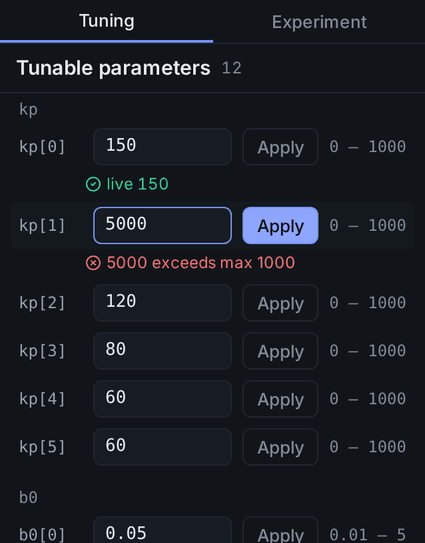
Applying a value
- Enter a number. If it differs from the value the controller is using, the field is highlighted and Apply turns on.
- Press Apply. On/off parameters apply as soon as you flip the switch.
- Read the result on the line under the row.
| Result | Meaning |
|---|---|
applying | Sent, waiting for the reply |
✓ live 150 | The controller took it, and the value read back matches what you sent. Clears after 4 seconds |
⚠ live 0.01 | The controller took it, but the value read back differs from what you sent. Stays on screen |
applied · unverified | The controller acknowledged it, but Lab could not read it back within 4 seconds. Clears after 4 seconds |
✕ reason | Refused or failed. The reason is the controller's own message (such as exceeds max), a communication error, or no reply within 4 seconds |
After ✕, Lab reads the value back once.
| The read-back finds | Then |
|---|---|
| The controller's value has changed | The field takes that value |
| The value is unchanged | Your entry stays, so you can Apply again |
| The request timed out, but the value you sent arrived late | The mark turns to ✓ |
| The controller refused the value | It stays ✕, even if the controller already had that value |
When tuning is locked
| Message | Meaning |
|---|---|
Tuning requires TRAJECTORY or BRAKED mode | The robot is in another mode, such as FREEDRIVE. Switch modes (What each mode allows) |
Protective stop · tuning locked | A Protective Stop is active. See Protective Stop and Recover |
Tuning managed by WIM — locked in this build. | This build locks the built-in controller. Plugin controllers you build yourself are never locked |
In TRAJECTORY, Apply can still fail with ✕ even when none of these messages shows. The robot driver checks the joint brakes again before it applies a value.
✕ reason | Meaning |
|---|---|
… one or more joint brakes are engaged. … | A joint brake is engaged. Release all brakes and apply again |
… a joint brake is still moving … | A joint brake is still engaging or releasing. Apply again when it has finished |
In BRAKED, tuning applies even with the brakes engaged.
Good to know
Applied values stay in the controller. Disconnecting does not undo them; only restarting the stack returns the controller to its starting values. There is no save or load and no reset-to-default button.
- When you reconnect, the result marks clear and the fields refill with the values the controller reported when it started. Values applied since then are not shown, so the fields can differ from what the controller is actually using.
- A recorded run stores the gains the controller was using. Which values count is described under Gains.