Stops and safety
This page covers how a client requests, reads and recovers from a stop, and what the stack does not guarantee.
Kinds of stop
| Stop | Triggered by | What the robot does | Recovery |
|---|---|---|---|
| Trajectory cancel | Cancelling the running goal | Follows the active trajectory controller's cancel behavior | None needed. Stays in TRAJECTORY |
| Brake stop | plem/ or protective_ in plem/ | Starts engaging the brakes, with no deceleration phase | set_ again |
| Protective Stop | The stack trips it itself (causes) | Cuts torque and engages the brakes | Manual: Recovery |
| Command-stale hold | Internal command updates stop for more than 100 ms while the robot moves | Holds the current pose with torque (not the brakes) | Automatic when commands flow again |
How the robot mode changes:
- A BRAKED request skips deceleration, because the brakes are the last-resort stop that needs no other thread to cooperate.
- Only TRAJECTORY → FREEDRIVE decelerates (STOPPING). If that does not finish within 2 s, the stack engages the brakes and drops to BRAKED instead of the requested mode.
Action results and rt_ can both disagree with what the robot did, and events can be dropped. Decide whether the robot is stopped, and whether a stop has cleared, only from status_ and status_.
robot_ turning BRAKED means the brakes have started engaging. The fieldbus layer engages them over several cycles. Check that the robot is still from the velocities in joint_.
There is no topic for brake state. The plem/ action, which opens and closes brakes per joint, returns a state, but that only says the drive finished its state change in software. It does not check the physical contact.
set_ is not for normal operationIt is a direct maintenance interface and prepares neither the mode nor the controllers. Use plem/ for normal operation.
- A release goal (
engage: false) is accepted only in TRAJECTORY or FREEDRIVE, because with no holding torque the joint would drop when the brake opens. - During a mode change (STOPPING), both release and engage goals are rejected.
- Even when accepted, brakes move per group. On modular brake hardware, joints you did not name in the same group open or close too.
Mode change rules
How the plem/ action handles goals and cancels:
| Request | Result |
|---|---|
| Cancel | Rejected |
| A goal for the current mode | The goal itself is rejected |
| TRAJECTORY or FREEDRIVE while another change is running | Rejected |
| BRAKED while another change is running | Accepted, and it cuts that change off |
| BRAKED while another controller owner holds the robot | Accepted |
TRAJECTORY or FREEDRIVE while the Jog lane (joint_) is active | Stops the Jog lane, waits until the arm is measured still, then switches. Aborts if it does not stop within 5 s |
When BRAKED cuts off a running change, the cut goal aborts with "preempted by BRAKED", and BRAKED tries to deactivate the controller that goal was activating. A goal that was about to finish may end SUCCEEDED instead. BRAKED's own controller cleanup is never cut off.
A BRAKED change also tries to deactivate the motion controllers after the mode changes. The goal succeeds even if that step fails. If you need the controller state, check controller_.
release_ and free_ in plem/ bypass the action server and change only the sub-mode and brakes. They do not switch controllers for the target mode or hand over the Jog lane. To actually run trajectories or use Freedrive, use plem/. protective_ sent in the same request as release_ or free_ only stops: the other commands, reset_ included, are dropped and the call returns failure.
PLEM software can neither trigger nor read the physical Emergency Stop. Its behavior and recovery follow the robot's safety manual. If the button takes a running axis out of Operation enabled, the stack sees only that result and trips a Protective Stop (causes). The interfaces are not designed for a client to tell it apart from other stops.
What happens to a running trajectory
In BRAKED or Protective Stop, the hardware layer ignores the trajectory controller's commands and overwrites them with the measured position, so the robot stops. How the running FollowJointTrajectory goal ends is not decided by this stack:
- An explicit BRAKED change tries to deactivate the motion controllers, and may still end in success if that fails (above).
- An automatic Protective Stop does not go through the mode server, so the controllers stay active.
The gripper is an action server that runs apart from the arm's mode and safety state. A running gripper goal is not cancelled when the arm goes BRAKED or into Protective Stop. Cancel the gripper goal yourself if it must stop too. The stop command is sent at the gripper server's next status poll, which runs every 50 ms or 100 ms depending on the gripper driver.
Command-stale hold
If internal command updates in the control stack stop for more than 100 ms while the robot moves, the stack fixes the current pose as the target and holds it with torque, because cutting torque would let gravity pull the arm down. This is not a Protective Stop.
- The hold covers faults inside the control stack. A dead external client does not cause it, because the hardware interface sends commands to the real-time layer every cycle and refreshes their timestamp.
- Once on, the hold stays until new commands arrive, even if the robot has stopped.
- It never engages in FREEDRIVE, where torque toward a fixed target would fight the operator's hand.
To stop a running motion, cancel the goal or request BRAKED. Your application has to do this.
Protective Stop
The stack trips a Protective Stop itself. The robot mode is forced to BRAKED and is not restored automatically.
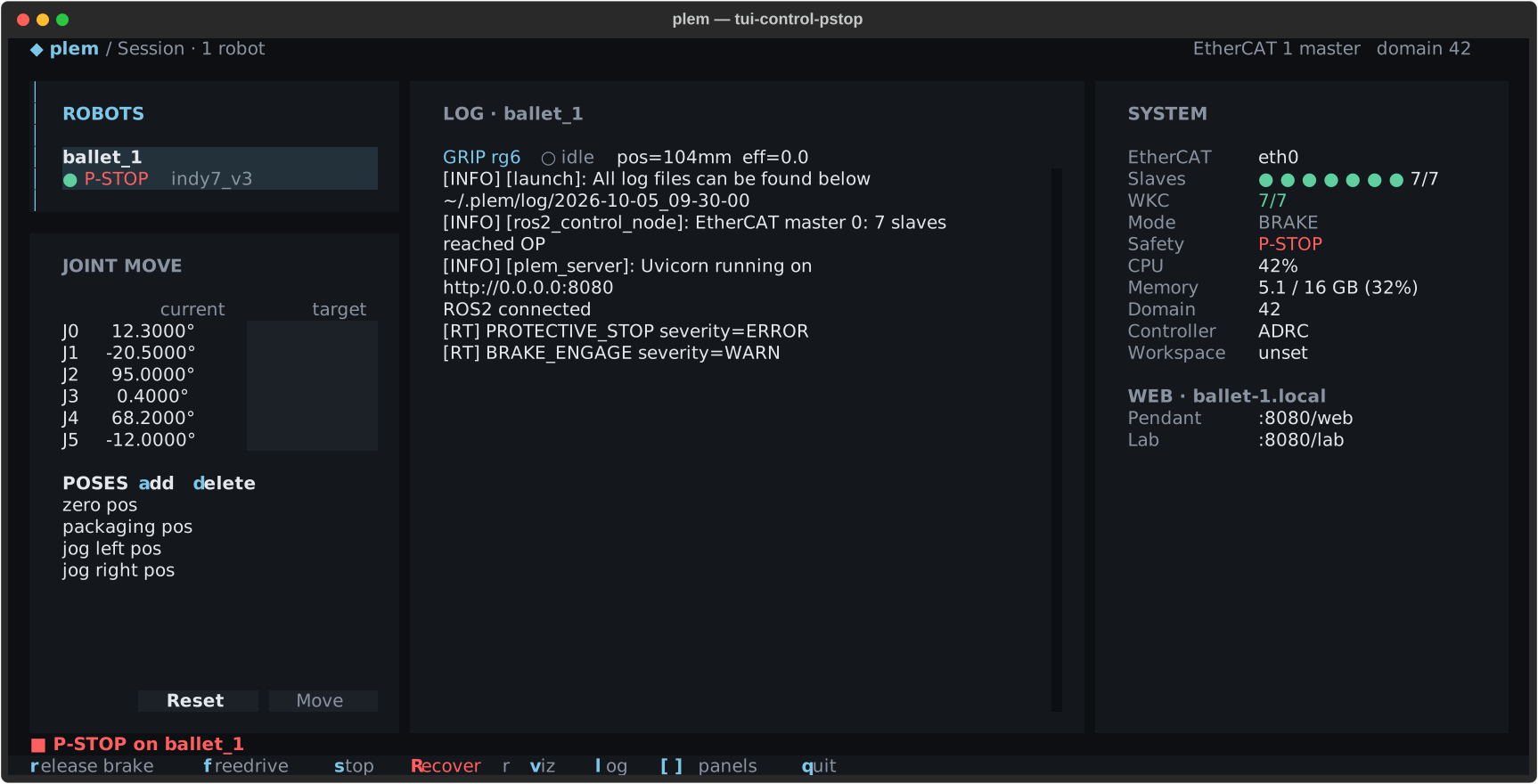
This is how the TUI shows it. A program gets the same facts from safety_ and rt_.
safety_ does not tell the causes apart. Every Protective Stop leaves a common PROTECTIVE_ in rt_, plus a cause event when there is one:
| Cause | Cause event |
|---|---|
| Joint position or velocity limit violated (per the URDF) | None |
| Protective floor violated: the lowest point of the robot and tool collision shapes is below the configured floor height (robots with the floor on) | PROTECTIVE_ (joint_ = segment index, value = lowest vertex z on the detecting cycle minus a margin of a few mm [m]; none if the pose could not be evaluated) |
| Disturbance overload (below) | DISTURBANCE_ |
| NaN or infinity in a received target | TARGET_ |
| Computed torque is invalid | TORQUE_ |
| EtherCAT working counter errors persist | WKC_ |
| Torque commands to the real-time layer go stale | COMMAND_ |
| Control cycle over budget (devices with a budget set) | CONTROLLER_ |
| While running (brakes released), an axis leaves Operation enabled, for example on a drive fault | OPERATION_ (0x61, error_ = that axis's statusword) |
| While running, an axis leaves its declared mode of operation | MODES_ (0x5F) |
- With no cause event (a joint limit, or a floor check that could not evaluate the pose), only the common event shows. Comparing the current
joint_with the URDF limits can suggest a position limit; a velocity violation or evaluation failure cannot be confirmed afterwards.states WKC_also appears without a stop, because a Protective Stop trips only when the error persists. Some clear paths emit noMISMATCH PROTECTIVE_.STOP_ CLEAR
Recovery
During a Protective Stop only BRAKED and FREEDRIVE can be entered. set_ and release_ are rejected.
- Confirm the Protective Stop in
safety_and find the cause inmode rt_.events - Remove the cause. If the robot is caught on a limit or an obstacle, switch to FREEDRIVE and guide it by hand to a safe pose. If it stopped below the protective floor, lift it above the floor: while it is below, both a reset and the return to BRAKED trip again on the next control cycle.
- Clear the stop with
reset_inerror plem/. If you used FREEDRIVE in step 2, returning to BRAKED clears it too, because the operator is taken to have confirmed a safe pose.control_ command - Check that
safety_is back to NORMAL. A successful service response does not mean recovery. If the cause remains, the stop trips again on the next control cycle.mode - Enter an operating mode again with
plem/.set_ mode reset_does not change the robot mode. If the stop has cleared but the robot is not moving, confirm it is back in BRAKED, then request the target mode again.error
The Teaching Pendant recovery button sends this same reset_. The steps on each screen are in Clearing a Protective Stop and TUI recovery. With several robots, one robot's Protective Stop does not stop the others. Your application has to stop them together if needed.
An automatic Protective Stop does not go through the mode server, so joint_ can stay active. Entering FREEDRIVE or TRAJECTORY through plem/ stops that lane, waits until the arm is still, then deactivates it, so you do not need to do it yourself. free_ in control_ skips this, so do not use it while the lane is still active.
Fault reset
Every reset_ requests two things: a new drive fault reset, and a software Protective Stop clear. If the cause remains, as with a joint limit violation, the clear is refused, the Protective Stop stays, and rt_ records a Protective Stop event with error_ 1.
Per axis, SERVO_ (0x60) in rt_ tells whether the request reached the drive: written (INFO), dropped because the axis was not in fault (INFO, normal during recovery), or dropped because the statusword could not be decoded (ERROR). PLEM does not resend a dropped request; send a new one if needed. This event can be dropped too.
If an axis faults while the brakes engage or release:
| Model | What happens |
|---|---|
| Neuromeka | No automatic reset. The sequence waits at that axis. Fix the cause, then send reset_ |
| Huayan Elfin | Requests a reset about every 200 ms while the fault lasts, up to 25 times per fault. Each request logs SERVO_ (0x58), and running out logs SERVO_ (0x59). Neither proves the drive actually reset |
Drives that will not clear, and held shutdown
If a drive stays in a state PLEM cannot move past, such as Quick stop active, that axis's brake sequence stops there. There is no command yet to clear such an axis, and no verified recovery procedure. A drive Fault is different: fix the cause and reset it with reset_ (above).
BRAKE_ (0x5C) in rt_ names the axis that could not proceed: error_ is its statusword, value the step it did not reach. It does not say why.
Models that declare brake groups (currently Huayan Elfin) switch the robot to BRAKED on stack shutdown and hold the shutdown until every brake group confirms engagement. Neuromeka robots shut down without this hold.
- While holding, they keep requesting engagement and log
brake engage UNCONFIRMED — shutdown HELDwith each axis's statusword. - A second shutdown signal (SIGINT and SIGTERM count together) makes them proceed without confirmation. When you stop with
plemorros2 launch, the SIGTERM that launch sends shortly after is that second signal, so the hold does not wait for the operator.
Treat any brake whose engagement was not confirmed as open.
Whatever the model, check by eye that the robot has stopped before you shut the stack down. If a drive will not clear, support the arm first. When software could not confirm that an axis's brake engaged, its physical brake is unconfirmed too.
Brake release refused
A brake release request (TRAJECTORY or FREEDRIVE through plem/, or release_) does not start at once even after the other checks pass. It starts the enable sequence only when every axis of the requested brake group meets both conditions in that cycle:
| Condition | Check |
|---|---|
| Accepted in its declared mode of operation | Initialized · statusword recognized · 0x6061 == declared |
| The axis's EtherCAT slave is in OP | The slave state the master reports (no pending reconfiguration) |
If any axis fails, the whole request is dropped, not deferred, and for each failing axis the stack tries to log an event. Requests blocked by other checks are dropped without an event.
| Event | When | error_ | value | What to do |
|---|---|---|---|---|
SLAVE_ (0x62) | The slave is not in OP | The slave's AL state (0 = offline or query failed) | Ring position | Right after launch the slave may still be on its way to OP: request again shortly. Otherwise check the kernel log (sudo dmesg | grep -i ethercat) for an AL status code or a rejected startup SDO |
MODES_ (0x5F) | Any other non-acceptance | The axis's statusword | 0x6061 display value | An observation, not a diagnosis of the cause |
- A refusal by itself trips no Protective Stop. Without another stop,
safety_stays NORMAL.mode plem/succeeds once the robot mode changes, soset_ mode robot_can read TRAJECTORY or FREEDRIVE while the brakes are still engaged.mode - When acceptance comes back, nothing is released by itself and
reset_does not resend it. Clear any Protective Stop first (Recovery), switch to BRAKED and confirm it, then request the target mode again. Skipping BRAKED fails: a goal for the current mode is rejected.error
An axis that drops out while running (Operation enabled) is handled differently: the stack requests a Protective Stop and starts or continues engaging all brakes on the next brake step, with the same BRAKED limits as above. It is logged as the same 0x5F; follow Recovery.
Disturbance overload guard
During motion the stack estimates the external torque on each joint. If it stays over that joint's budget for 200 ms or longer, the guard trips a Protective Stop. Short spikes do not trip it.
- The budget comes from the URDF
effortandvelocitylimits and grows with speed, so it is strictest at standstill. - There is no parameter and no on/off switch.
- It judges only with a controller that has an observer (the default, ADRC), and only in cycles where torque control actually ran: not in BRAKED, FREEDRIVE or an active Protective Stop. Under control it judges even when the arm is still.
The guard works from current-based estimates, so friction and model error mix with real contact. It is there to protect the machine. ISO 10218-class force and power limiting is the robot safety controller's job.
Limits of plan-time checks
PlanTrajectory checks only at planning time: joint limits and Pilz self-collision and static-object validation. There is no workspace box check, no continuous monitoring during execution, and it is not a safety-rated function. Keeping the robot physically inside a workspace is the job of the robot safety controller or an external safety PLC.
Trajectories you build yourself skip these checks entirely, and on some models success does not mean the target was reached. Both are in the client rules of ROS 2 interfaces.