Robots and gripper
The Robot settings panel in the left rail edits the camera, gripper and F/T sensor of the registered robots. You cannot register a new robot here: registration is a hardware procedure tied to joint calibration, and it is done at the factory before delivery.

Each row shows the name, the serial, and badges for the configured gripper and F/T sensor model. A torque controller badge appears only when it is not the default (ADRC). The row's ⋯ menu:
| Item | Opens | Notes |
|---|---|---|
| Gripper settings | The settings form for the gripper model | Only for robots with a gripper. The server decides the fields, which depend on the model |
| Camera settings | Camera model and serial | Detect fills in the serial of a connected camera |
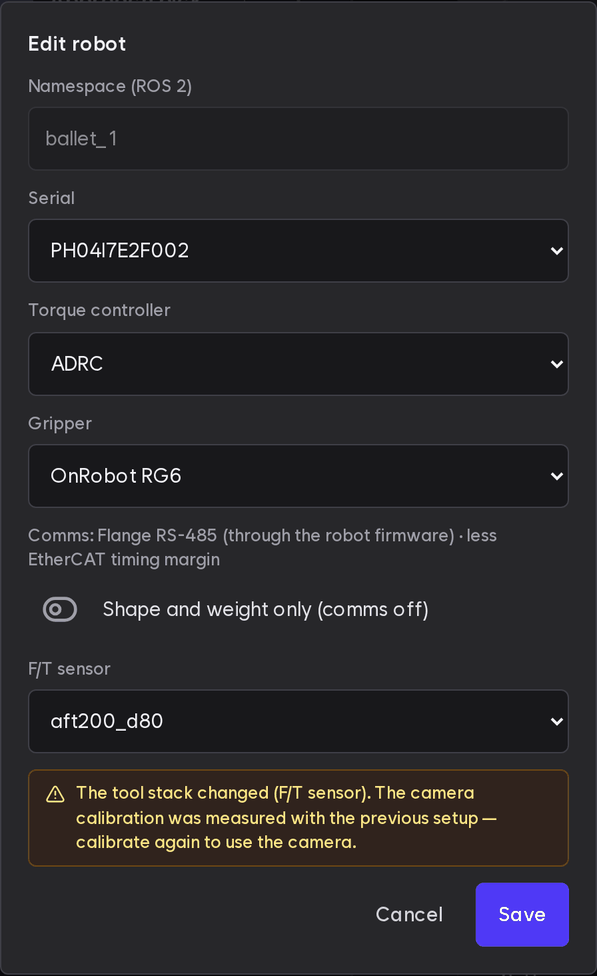
| Edit | Gripper and F/T sensor (F/T sensor) | The serial and torque controller in the same window are set for the delivered robot. Contact support to change them; custom controllers are in Custom torque controller. A saved model not installed on this device shows as "model (not installed)" |
| Delete | Deletes the robot profile | Confirm with Confirm delete in the menu. Closing the menu cancels |
Changed settings apply from the next stack start.
Changing the model or serial of a calibrated camera shows a warning. The calibration belongs to that camera unit, so you must measure again.
- With a different camera model, start-up is not blocked: the camera falls back to its default position and perception stays off until you measure again (Current value).
- With the same model and only a new serial, the old measurement still applies and perception turns on. Measure again before you start.
Deleting cannot be undone, and there is no way to register the robot again. Do not press it; contact support if you need to.
Gripper status
When the running robot stack drives a gripper, a Gripper status card sits above the robot list. It shows the state with an icon, a color and a word, and the current width against the gripper's maximum, such as "42.5 mm / 95 mm".
| State | Meaning |
|---|---|
| Checking | The card just opened and no state has arrived yet |
| Moving | The fingers are moving |
| At target (empty) | The fingers reached the target width and hold nothing |
| Holding part | The gripper holds a part |
| Part dropped | The gripper reported that it dropped the part it held. Shown until the next gripper command |
| Needs initialization | Not initialized yet, so the gripper ignores position commands |
| Gripper error | The gripper reported an error |
| Idle | None of the above (just after start, for example) |
| Disconnected | The gripper does not answer, or no state came for over a second. Check the gripper cable and the tool power. The last width is not shown |
These two states show only when the gripper reports them. The OnRobot RG6 and Danhae grippers do not, so a dropped part never shows as "Part dropped". For such a gripper the card adds "This gripper does not report a dropped part or a needed initialization."
Initialize the gripper
Grippers that need initialization after power-on, such as the DH-Robotics AG-95, show "Needs initialization" on the card, the warning "The fingers travel all the way — make sure no hand or object is near them", and an Initialize button. Clear the area around the fingers, press the button, then press Initialize again in the dialog. The card's state changes as soon as it finishes.
- With a Job running or paused (simulations too), initialization is blocked and the dialog says why. Try again after the Job ends.
- If initialization does not finish within 10 s, or the gripper does not answer, the dialog shows the failure and the reason. Check that nothing blocks the fingers, check the gripper cable and the tool power, then try again.
- Restarting the robot stack or the gripper driver never moves the fingers by itself. Only this button initializes.
- Grippers that need no initialization (OnRobot RG6 and others) have no button.
Tool stack warning
On a robot with a camera calibration, changing the gripper or F/T sensor in Edit shows a warning that the tool stack changed, since a camera on the tool moves with it. Saving and start-up are not blocked. The TUI robot settings and plem profile show the same warning once on save. What to do is under If you changed only the gripper or F/T sensor.