Stops and recovery
This page covers how the TUI shows a Protective Stop, what R does, and how to stop the stack and quit. Stop types and the recovery rules for every client are in Stops and safety.
Protective Stop alert
When a Protective Stop starts, several parts of the screen change at once.
- The terminal bell rings and a red notice appears:
[<robot>] PROTECTIVE STOP activated — robot braked. - The state line turns to red
■ P-STOP on <robot>, and SYSTEM Safety turns toP-STOP. - The mode in the robot row turns to
P-STOP. - The log gets
[SAFETY] NORMAL → PROTECTIVE_.STOP - A red
R Recoverappears in the key bar.
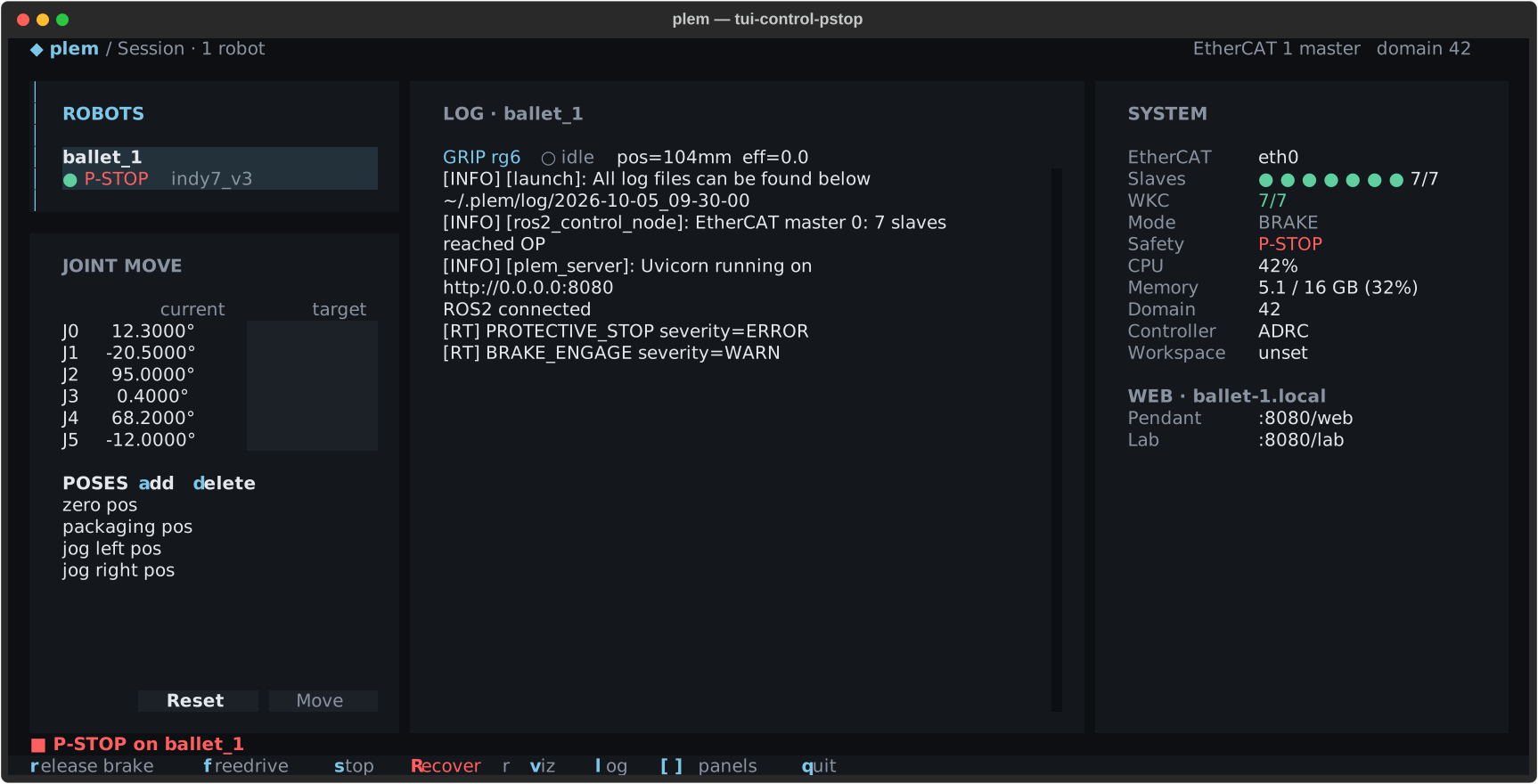
The [RT] lines in the log point to the cause. These are the common ones.
| Event | Meaning |
|---|---|
PROTECTIVE_ | Protective Stop entered |
PROTECTIVE_ | The lowest point of the robot or tool collision shape went below the protective floor. The driver log names the link |
DISTURBANCE_ | External force over the limit: the arm is pressed or pushed by something |
FOLLOWING_ | Following error stuck at its limit. External force, a jam or overload, among other causes |
SERVO_ | Servo drive fault |
WKC_ | Missing EtherCAT device responses |
DEADLINE_ | Control cycle overrun |
R: recovery
When R Recover shows, R acts on the selected robot's current state. The [RECOVER] lines in the log record what it did.
The sections below give the key order for each case.
Physical cause
An Emergency Stop button, an external force pressing the arm, or a fieldbus problem.
- Remove the cause.
- Press
R. - When Safety returns to
NORMAL, pressrfor Trajectory orffor Freedrive.
Joint limit or protective floor
While a joint is outside its limit or the robot is below the floor, the error reset is refused, so R alone does not clear it. Freedrive is allowed during a Protective Stop, so you move the arm back with it.
- Press
ffirst. The robot row showsFREE P-STOP: the brakes are open and the arm moves by hand. - Move the arm back inside the range by hand. The
[LIMIT]lines in the log name the joints. For the protective floor, lift the arm above it. - Press
fagain. The robot brakes and the Protective Stop clears: PLEM takes this as your confirmation that the pose is safe. - If the Protective Stop comes back, its cause is still there: a joint is still outside, or an
[RT]line names another cause.
FREE P-STOPWhile the row shows FREE P-STOP, the arm is held by no brake. f or r brakes it. s or the Emergency Stop stops it.
A joint outside its range without a Protective Stop takes the middle branch: R puts the robot in Freedrive. Move the joints named in the [LIMIT] lines back, then brake with r.
Drive fault
R brakes first, then sends the error reset. If an [RT] BRAKE_ or SERVO_ line appears after your next r or f, the fault is still there.
When recovery fails
| Notice | Meaning |
|---|---|
Recovery: braking failed: … | The brake was refused. Software recovery may not be possible at this layer |
Recovery: braked; FreeDrive refused: … | Braked, but Freedrive was refused for the reason shown |
reset_ | The error reset was not accepted or not confirmed |
- Check SYSTEM Mode and the link dot in the robot row.
- Check the physical cause again, then try
Ronce more. - If it still fails, check the drive state with the manufacturer's tool. Power-cycle the control box only as a last resort, following your safety procedure.
Stopping the stack (s)
s on a running stack shuts it down in a safe order. The state line shows the step.
Braking robots...: a brake request goes to every robot first, and the TUI waits for the replies. A failure does not stop the sequence. Check with your own eyes that the robots stopped, and use the physical Emergency Stop if any one is in doubt.- The ROS 2 connection is closed.
Stopping processes...: the stack processes are stopped. The TUI waits up to 40 seconds for a clean exit before it kills them. A launch with the camera showsStopping processes (waiting for camera to close)...and can take long, because a camera driver cut off midway may not attach on the next launch. Cleaning up leftover processes and ROS resources can take a little longer after that.All robots stopped: process cleanup is finished. Whether the robots physically stopped is what you checked in step 1. RViz and PlotJuggler close too.
The TUI does not check that the physical brakes engaged. BRAKE in the robot row means the brake command was accepted. During a Protective Stop, P-STOP shows instead.
Keep the session while a Job runs
The Job and the robot stack belong to the plem session. Over SSH, run plem inside tmux.
If the terminal closes or SSH drops, the TUI gets SIGHUP and sends the stack a stop signal without its brake request, then kills what is left 2 seconds later. That cleanup does not check the physical brakes.
The TUI does not know about running Jobs, so q and s give no Job warning. Stop the Job with ⏹ on the Teaching Pendant first, check that the robot stopped, then use s or q.
Quitting (q)
One q stops the stack and then quits. While the stop runs, the key bar shows q twice: force quit. A second q tries the brakes for at most 0.5 seconds and then kills the processes, which also cuts the camera's shutdown short. Let the stop finish unless you have to force it.
Do not switch the device off to quit. The TUI's brake step does not run then.
When the stack dies on its own
When a stack process ends unexpectedly, the bell rings and this notice appears. A brake request goes to every robot launched with it before the stack shuts down. <vendor> is the robot vendor that launch handles.
Launch (<vendor>) exited unexpectedly (exit code N). Stopping the fleet (brake first) — press s to start again.
If it ended during launch, … during startup — aborting. appears and the launch stops. The log keeps a [CRASH] Launch process (<vendor>) exited unexpectedly (code=N) line.
- As in the stop sequence above, check with your own eyes that the robots stopped.
- Read the last lines of the log.
- Launch again with
s. If it keeps happening, see Troubleshooting.
If it stopped because the measured kinematics failed validation, the notice also has a [measured] <robot> rejected: … line. Follow the action it gives or contact support.
If the TUI itself crashed and left processes behind, clean up with plem kill in a terminal and run plem again.